Wednesday, 22 February 2012

Download UC Browser 8.0 for Android,Symbian,Java,Blackberry,iphone iOS, Windows Mobile


UC Browser Officially recently released the latest version 8.0. UC Browser is one of the most popular Browser used by many of mobile internet users and even i have also installed it on my Nokia Phone and using it since long time ago. It is the coolest browser that i liked the most after Opera. It has cool features that i liked the most and kept the opera behind.First i was using Opera mini Browser for my Nokia But after i installed once the UC Browser then i stop using opera and since then i am always using UC Browser. UC Browser 8.0 is Now available for many Platforms such as Windows Mobile, Iphone, iOS, Android, Symbian, Java, Blackberry  and if your mobile doesnt fit in this then there is Generi Version of UC Browser 8.0 so that you can use it on your Mobile Phone.


Features: UC Browser has amazing features that may make you change your browser that you use. You can download your file with blazing speed and can resume it if you have closed down your browser. It always pop out security warning whenever your are putting confidential information over it, this makes the surfer more alter about the information that he puts in, this shows the security strength of the UC Browser. The Latest version that amazing features that was not in previous version.The new look of UC Browser is different from older version that make your feel that you are using internet on your PC. The homepage of  UC Browser 8.0 show you the thumbnails of most visited web-site by you. It suggest the web-site name even if you have put it half the name of the website you want to visit. 

So check our the new and amazing features of UC Browser 8.0 the latest version on your mobile platform by Downloading from the Download links below that are provided.

UC Browser 8.0 Official Download Links for Windows phone, iPhone, Android, Blackberry, Symbian, Java and Generic Version for other phones


Download Now UC Browser  for


>Android        >Symbian       >Java       >Iphone     >Blackberry      >Windows Mobile


Download Now UC Browser 8.0 for Other Mobile Phones


>UC Browser 8.0 (Generic Version)

You May Also Download UC Browser 8.0 from Android Market for Andriod Phones, From Apps Store for iPhone, from Nokia Ovi Store / Nokia Store for Nokia Mobile Phones.


Incoming Search Terms and Tags :
* UC Browser 8.0
* Download UC Browser 8.0 beta official link
* UC browser for Nokia, Symbian, Blackberry, iPhone, iOS, Android, Windows Phone,
* Download from Android Market
* Uc Browser new version for mobile phone
* Latest version of UC Browser

Thursday, 16 February 2012

Remove/Delete autorun.inf infected files by using autorun eater


Many of times you have met with an error by your antivirus saying that autorun.inf file is infected though your antivirus doesn't delete that file.You may have tried many other antivirus to deleted this autotun.inf virus from your removeable disk drives but it doesn't. To get it deleted any how you finally format your pendrive or removable disk drive.

Now Don't just get frustrated of this infected file use Autorun Eater to get it deleted and relax.
 
Autorun eater is a small freeware available for download that takes care of your pc from autorun infected files and deleted them after showing a warning on the screen. It's a small utility that gets installed withing few seconds and gets precessed at background and gets placed in the system tray i.e. in the below right side of your desktop.

It a freeware that automatically delete the infected files as soon as your plug in your infected devices and shows a warning at your screen and protect your pc to get infected from autorun.inf virus.

Autorun eater also gets pin up in startup menu so you dont need always to click and open application.

Features of Autorun Eater include scanning local hard drives, setting priority (high or normal), setting removal method (automatically or ask for confirmation), closing autoplay (enable or disable) .
Autorun eater also fix your Regedit issue, task manager, folder options and many more.


Key Features of Autorun Eater
Scans and remove infected autorun.inf files from all your hard disk drives.
Priority scanning (high or low)
Add or Remove from startup registery
Scanned results are logged
Backups infected files if it represents a false infection
Shows warning for deletion of infected files


Download Autorun Eater Updated Verision here

Wednesday, 11 January 2012

How to Add/embed Picasa Slideshow in your Blog Post?

Embedding Albums, Slideshow in Blogpost.
[ Step by Step Tutorial ]


Add Pictures as Slideshow to your Blog Post. Bloggers are interested in adding images in the form of Slideshow in their Blogpost to make the post attractive and easy to understand the reader. As images speaks more than thousand words so this tutorial let you add your picture/images in your blog post as slideshow from picasa web album.

Addding pictures or images as slideshow in your blogpost makes it attractive and easy to understand by the reader as it does not make post too long as it is done in by simple adding images in your blog post which is not good.


Part 1. Adding Picasa Slideshow in Blogpost in Blogger
--------------------------------------------------------------------------------

1. Goto picasa web albums and sign in with google account
                                     OR
   Alternatively you can download picasa tool which is freeware/ free tool to
     upload picture on picasa web albums

2. Upload pictures in your web album and give a suitable name to album [ Click on image to enlarge ]


3. In My Photos-> Click on Name of the Album you want as Slide show in your Blogpost
   [ Make sure the visibility of album is public ]


4. Click on Link to this album on right hand side [ album visibility should be public then only it will work]


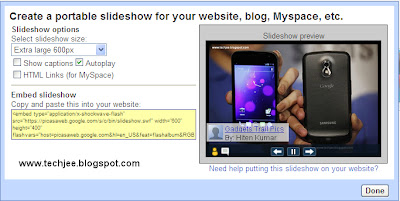
5. Click Embed slideshow. A popup showing slideshow configuration and HTML code will appear with preview as slideshow of album selected


6. Change Slideshow settings according to your need. Settings Such as Size, Autoplay, Captions etc.


7. Copy the Embed Slideshow Code as show in above image


Part 2 : Embedding the Slideshow into Blogger/Blogpost
---------------------------------------------------------------------------------
1. Goto Blogger post Editor
2. Switch to HTML Mode or Click on Edit HTML
3. Paste the Copied code at the place you want your Slideshow to be show
4. Save your Blogspot
5. See the Post. The Slide show will be playing inside the Blogpost at a position your pasted the code
   [ Just as Shown above]

Tuesday, 10 January 2012

Datawind Aakash Tablet -14lakhs units Booked in 14days


Aakash being the cheapest tablet in the world, 14lakhs units of Aakash Tablets have been booked  just in two weeks after it was put on sale online for Rs.2500/- a piece. The Aakash tablet has created a record of been booked of 14lakh units.
 
Aakash tablet

Datawind currently has only one Factory in Hyderabad but because of unexpected demand for tablet vendor-Datawind has decide to put up three new factories in Cochin, Noida and Hyderabad in the first half of 2012 for fast delivery of tablets. During Online sales Datawind received 1 lakh orders of  aakash tablet per day.

Aakash(UBISLATE 7) has been booked and Company has started bookings of UBISLATE 7+ an upgraded version of Aakash(UbiSlate 7) Tablet. UbiSlate 7+ has also been booked for the month of January 2012 and February 2012 and Company has started the Pre-Booking of UbiSlate 7+ for the month of March.

Here’s snapshot of Booked tablets and pre-book of March 2012


UbiSlate 7+ (upgraded version of Aakash) is Better than Aakash as it has Cortex A8 - 700 Mhz Micro processor with GPRS, 3200 mAh , Sim & Phone Functionality. UBISLATE 7+ has a price tag of Rs.2,999/- and you can Pre-Book it for the month of March 2012 From here